The Problem
You built a tracker. Habits, expenses, reading list — doesn't matter. You used it all week, it filled up with your real life, and then you closed the tab. When you came back, it was empty. Everything you typed is gone, and the app greets you like a stranger.
Ask around and you'll get the same diagnosis everywhere: "you need a backend." That answer lands heavy — servers, databases, a second education. So the tracker joins the graveyard of apps that worked perfectly and remembered nothing.
Here's what nobody said: the diagnosis is usually wrong. Not because your app doesn't need to remember — because "a backend" is the answer to a question nobody asked you first.
The Question That Decides It
Data has to live somewhere, and there are exactly three somewheres that matter. In the app's memory — gone on every reload; that's your tracker today. In this browser, on this device — the browser has a small built-in store (known as localStorage) that survives reloads and closed tabs, needs no account, no keys, no rules. Or on a hosted service — a database someone else runs, which your app talks to from anywhere.
Which one you need is decided by one question — not a technical one:
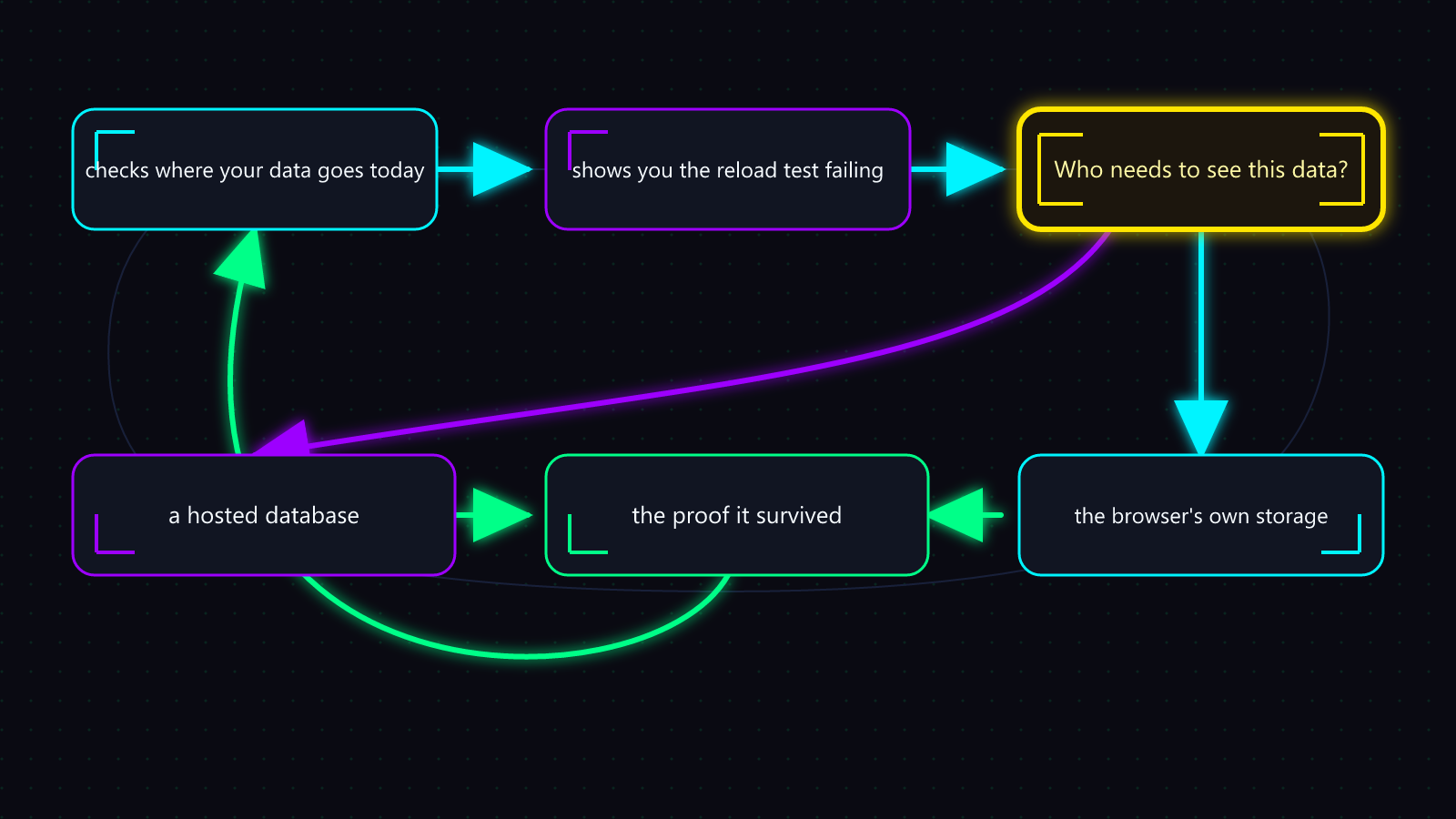
Who needs to see this data?
- Just you, on this device → the browser's own storage. Minutes of work. Genuinely done.
- You, from your phone and your laptop → a hosted database, with rules that say only you can read it.
- Other people too → a hosted database, rules per person — and a heads-up: letting people sign in is its own job, not a storage feature.
Importance is the trigger — not size, and not seriousness. Don't add a database because the app feels "real" now, and don't wait for some magic number of rows. A tiny shared appointment needs hosted storage; a huge solo game save belongs in the browser. Who needs the data, where they need it, and what losing it would cost — that's the whole decision.
Most vibe-coded apps are the first row. That's not a consolation prize — device-local storage is the correct engineering for a personal tool, and "add a database anyway, for later" buys you accounts, keys, and access rules for a later that mostly never comes. The move: answer the question honestly, then do the smallest thing that answer requires.
The Loop That Does This
You don't wire any of this by hand. You ask for the outcome:
A normal request
"My app loses everything when I close the tab. Make the data stay. Ask me whatever you need to decide where it should live — and if it needs a real database, set it up in a throwaway project first and prove saving works before touching my app."
A capable agent runs the loop from there: it checks where your data goes today (usually nowhere) and shows you the reload test failing. It asks you the who-sees-it question. If the answer is "just me, here," it wires the browser's storage — stamped with a version number, so a future change to your app can recognize old saved data instead of choking on it — and you're done in minutes. If the answer needs a hosted database, it creates a disposable sandbox project first, switches the access rules to deny-by-default before any real data exists, connects your app with the key that's safe to be public — and then proves it: writes data, reloads, reads it back, and shows that a request without credentials gets refused. Only after that proof does your real app get touched.
Good and bad runs are easy to tell apart. A good response starts by showing you the loss actually happening, then asks who needs the data before proposing anything. A bad response creates a cloud project in the first minute, or announces "saved!" because a success message appeared — a message is not your data surviving a closed browser. Either way the loop ends with a one-page record: where the data lives, who can see it, and the proof it survived.
Do it once with the agent narrating, and "backend" stops being a wall — it becomes a question you know how to answer.
Where It Bites
1. Saved — On Exactly One Machine
Symptom: the app remembers everything. Then you open it on your phone, and it's empty. Or you clear your browser one day and years of entries evaporate.
Root Cause: browser storage lives in that browser on that device, and the browser may clear it under pressure. Nothing broke — the data was always device-local; nobody made the boundary out loud.
Recovery:
- If the data still exists on the original device, export it now: "add an export button that downloads my data."
- Re-answer the who-sees-it question honestly — it was "me, everywhere" all along.
- Move to a hosted database with the sandbox-first loop above, importing the export.
Prevention: when the agent wires browser storage, have it show you the app in a private window — feeling the boundary once beats reading about it. And any data you'd mind losing gets an export button on day one.
2. The Database Everyone Could Read
Symptom: none. The app works perfectly. The problem is a stranger with your project's URL can read — or edit — every row, and you'll learn it from a stranger.
Root Cause: the database went live with access rules off, "to get it working first." Hosted databases are reachable from the whole internet by design; the rules — known as row-level security — are the wall. Off means open. And turning them off to make a connection test pass doesn't fix the test; it deletes the boundary the test existed to check.
Recovery:
- Turn on deny-by-default rules now, even though it breaks the app.
- Re-allow exactly what the app needs, rule by rule, testing after each.
- Assume what was open was read. If anything personal was in there, treat it as leaked.
Prevention: rules on before the first row of real data — that's why the loop enables them in the sandbox, where breaking the app costs nothing. An agent that proposes "we'll add security later" is proposing this card. The useful failure is the one that says "not allowed" — fix the narrow rule, never the wall.
3. The Wrong Key in Public
Symptom: the app works — that's the trap. A hosted database hands you two kinds of key, and the powerful one works fine from frontend code right up until someone reads it there and owns your data.
Root Cause: hosted databases issue a publishable key (safe in app code — the access rules still apply to it) and a secret key (bypasses the rules; server-side only). Frontend code is public, and generated code and old tutorials sometimes reach for the secret key because it makes errors go away. Hiding it in a settings file with a frontend prefix changes nothing — it still ships to every visitor's browser.
Recovery:
- Rotate the secret key at the database host — first, before anything else.
- Have the agent replace it with the publishable key and fix the rules the secret key was papering over.
- Sweep the project for the old key, including past commits.
Prevention: one standing sentence in any database request: "publishable key only in the app — if something needs the secret key, stop and tell me." The loop treats that boundary as absolute; so should you.
The Card You Keep
Where should this data live?
- Who needs to see it? Me-here → browser storage. Me-everywhere → hosted, single-user rules. Others → hosted, per-person rules.
- Private data but no sign-in? Stop — decide how people prove who they are first. A public table is not a shortcut around identity.
- Proof, not vibes: it isn't "saved" until you've written, closed the browser, reopened, and read it back — and for hosted, until a request without credentials gets refused.
- Two red lines: rules on before real data; secret key never in the app.
One question decides all of it: who needs to see this data? Answer that honestly, run the loop, and your tracker keeps what you typed.