The Problem
Your app works. You built it in an evening, it does the thing, and you want to show someone. So you send them the link — and realize there isn't one. localhost:3000 is an address that only means something to your own machine. The app exists the way a diary exists: real, functional, and completely invisible to everyone else.
This is the wall most vibe-coded projects die against. Not a bug, not a limitation of the AI — just the gap between "runs on my laptop" and "has a URL." The natural next prompt is "make it live," and that sentence is its own trap: it's how a first public demo becomes an accidental production release. Because the word deploy sounds like a job title, most people either stop at the wall or vault it blind. Both are wrong, and the fix is the same two rails.
What Deploying Actually Is
Ten years ago, putting an app online meant renting a server and becoming its part-time administrator. That's the version of "deploy" your instincts are afraid of, and it's gone. For the kind of app you vibe-coded, deploying now means: a host takes your project, runs the same build that runs on your laptop, and serves the result from a URL. Free tiers at hosts like Vercel, Netlify, and Railway cover a hobby app comfortably, and your agent already knows how to drive all of them.
What you do need is the map of the three places your app can be:
- Local — only your machine can see it. This is where you change code.
- Preview — a real, public-but-obscure URL that is not your live site. This is where you find hosting mistakes safely.
- Production — the address you intend people to rely on. Moving a preview here is a separate action with a separate yes.
The two rails fall straight out of the map. Preview before production: the first person to see your deployed app should be you, not everyone. Know your way back before you go forward: hosts keep your previous deploys and restoring one is a single action — but that fact only helps if you know it before the bad deploy, while you're calm.
A preview is public, not private. "Preview" describes which address it hangs off, not who can reach it — anyone with the link can look. Nothing secret goes in the upload because the URL sounds unofficial: no passwords, no keys, no exported customer data. Settings the app needs live in the host's settings panel, never in the code it serves.
The Loop That Does This
You don't need to learn a deploy procedure. You need to ask for the outcome with the rails in the sentence:
A normal request
"Put this app on a public URL I can send to a friend. Deploy it to a preview first and show me — don't make anything live until I say so. And before you send anything anywhere, check nothing secret is in the code."
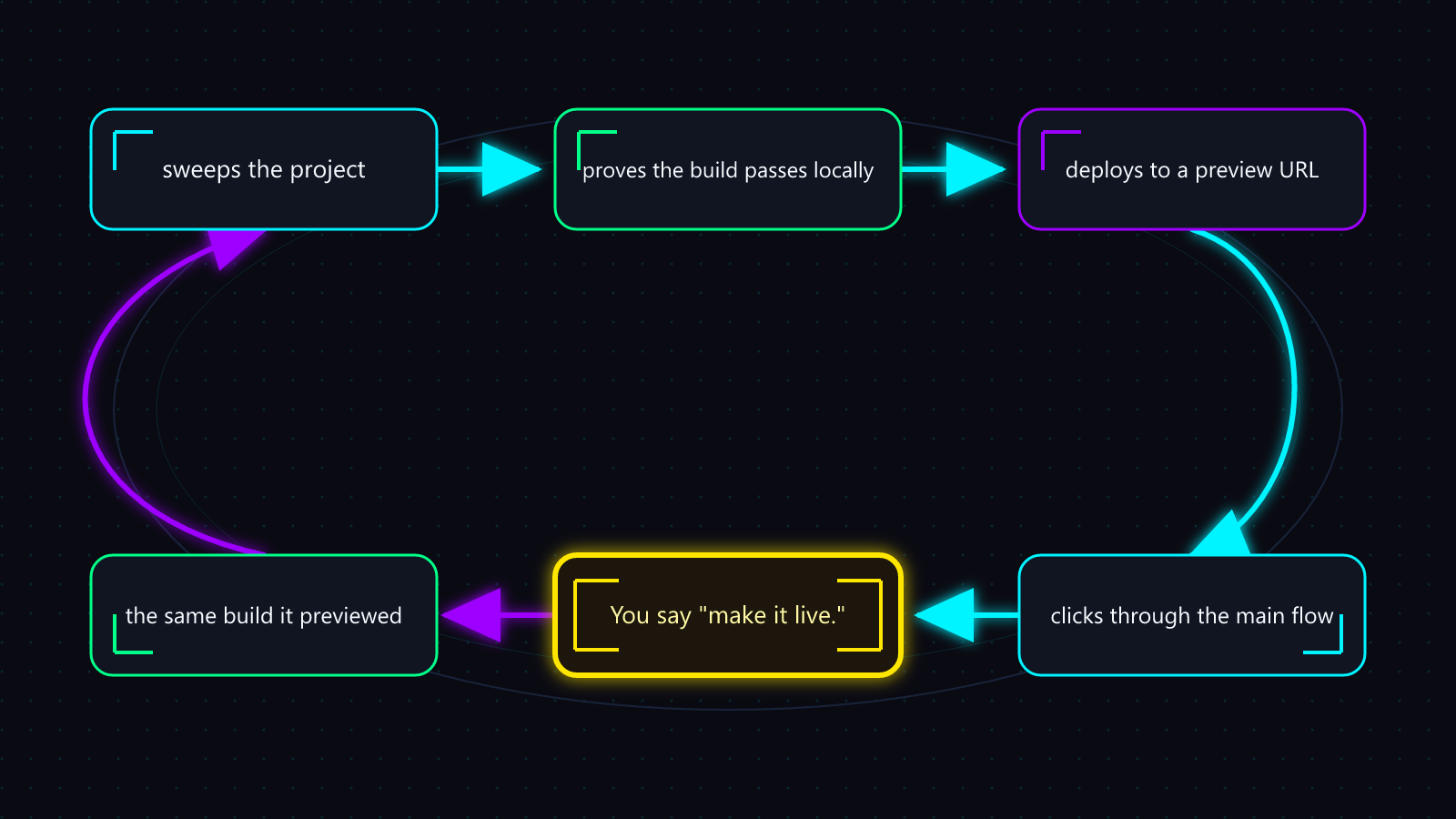
Said like that, a capable agent runs the whole loop: it sweeps the project for keys and passwords before anything is uploaded, proves the build passes locally, deploys to a preview URL, clicks through the main flow in a real browser, and then stops — showing you the preview, the list of settings the host will carry, and the exact one-step rollback you'll have once it's live. You look at the preview. You say "make it live." Only then does it promote — the same build it previewed, not a rebuild — and it finishes by writing down the rollback step where you can find it.
You can tell a good run from a bad one without reading a line of code. A good response hands you the actual preview URL, names what it tested there, and says plainly that production was not touched. A bad response says "deployed!" with no URL, offers a passing build as proof the app works, or quietly makes the preview the live site while you're still reviewing. The judgment calls — does the preview look right, do I want this public — stay yours; everything mechanical is the agent's.
The first time, watch each step and ask what it's doing. Not because the loop needs supervision — because the failures below are much easier to recognize once you've seen the healthy version run.
Where It Bites
1. Works on the Laptop, Dies on the URL
Symptom: the preview loads, but the app is broken — data won't fetch, pages error, features that worked all evening are dead.
Root Cause: your laptop had things the host doesn't — usually settings from a local file the host never received, or a build difference. The app didn't break; its environment didn't travel.
Recovery:
- Say what you see: "the preview fails to load data that works locally."
- Have the agent compare what the app reads locally with what the host carries.
- Add the missing settings on the host's side — never by pasting them into the code.
- Redeploy to preview. This is exactly why the preview exists.
Prevention: the settings inventory is part of the deploy loop. If your deploy report doesn't list what the host carries, the loop was skipped.
2. The Secret Went With It
Symptom: everything works. Weeks later — strange charges on an API account, or an email that your key was found in public.
Root Cause: a key that was safe on your laptop shipped inside the deployed code, where anyone can read it. Deployed frontend code is public by definition. This is the one deploy mistake that costs real money, and it's silent on launch day.
Recovery:
- Rotate the key first — at the service that issued it. The leaked one stays dead forever.
- Move the new key to the host's settings, out of the code.
- Redeploy, and have the agent re-sweep to confirm the code is clean.
Prevention: the sweep runs before every deploy, not just the first. "Check nothing secret is in the code" is one sentence — leave it in your request permanently.
3. The Deploy You Can't Undo
Symptom: the new version is live and it's broken. People are looking at it right now, and you have no idea how to get the old one back.
Root Cause: nothing — the way back exists. Hosts keep your previous deploys, and restoring one is one step. What's missing is that you're learning this now, mid-panic, instead of before you promoted.
Recovery:
- "Roll back to the previous deploy." One action. Do it before diagnosing anything.
- The broken version goes back to a preview URL, where it can be fixed in peace. Production is not the debugging sandbox.
Prevention: the loop records your rollback step before promoting to production. If you can't name your rollback step right now, you're one deploy away from this card.
The Three Questions
Two things a first deploy never includes: a payment method, and a custom domain. Free tiers carry a hobby app easily, and the host-provided URL is fine to share — keep it until deploying and rolling back are boring. If an agent's deploy plan involves entering a card number or changing DNS, stop and ask why; that's a decision, not a step.
Before any deploy of yours goes live — first or five-hundredth — you can answer yes to all three, in under a minute:
Live-deploy check
- Did I see it on a preview URL first? If the first person to see this deploy is the public, the order is wrong.
- Do I know my one rollback step? Not "rollback exists" — the actual step, written where you can find it while flustered.
- Did anything secret ride along? A sweep answered this; memory didn't.
That's the whole wall. Preview first, know the rollback, sweep the secrets — then send the link.